Containers (Apptainer)
Package custom software stacks, 32-bit applications, or data-heavy scientific workflows into single-file, reproducible Apptainer containers on Ngarrgu Tindebeek (NT) and OzSTAR.
Before you start
Load the apptainer module (singularity is a global alias for apptainer):
module load apptainer
For comprehensive upstream documentation, see the official Apptainer user guide.
Building a container from a definition file
Apptainer .sif images are built from plain-text definition (.def) files, analogous to Dockerfiles.
The example below packages a Conda environment starting from the Micromamba Docker image. For a pip-based Python container example, see Containerised Python with Apptainer; for additional recipes (Astrometry.net, HEASoft, IRAF, SExtractor, and more), see Apptainer Example Recipes.
Note
Replace <tag> and <version> with a current Micromamba Docker image tag and Python version for your workflow (pinning explicit tags keeps builds reproducible). Check the host GLIBC version (ldd --version) if a build encounters fakeroot errors (see Fakeroot and GLIBC compatibility).
Create a definition file named bilby.def:
BootStrap: docker
From: mambaorg/micromamba:<tag>

%post
    micromamba install -qy -n base -c conda-forge python=<version> bilby gwpy python-lalsimulation
Build the .sif image:
apptainer build bilby.sif bilby.def
This downloads the base Docker image, converts it to .sif format, installs the specified packages into the container's base Conda environment, and saves the result as bilby.sif.
Run a Python script inside the container:
apptainer run bilby.sif python my-script.py
You can also invoke the .sif file directly (./bilby.sif python my-script.py), or run ./bilby.sif my-script.py if my-script.py is executable and starts with #!/usr/bin/env python.
To expose additional host directories, pass -B:
apptainer run -B /fred/<project>,<path/to/other/dir> bilby.sif python my-script.py
Note
Everything after the .sif filename runs inside the container. Because Apptainer bind-mounts $PWD by default, a script in your current working directory is accessible automatically; files located elsewhere on /fred require an explicit -B bind mount.
Binding directories and images
By default, host directories outside standard bind paths are hidden inside a container. Use -B (--bind) to mount host directories into the container at runtime.
Bind /fred/<project> at the same path inside the container:
apptainer run -B /fred/<project> mycontainer.sif
Bind /fred/<project> to a different path (/project) inside the container:
apptainer run -B /fred/<project>:/project mycontainer.sif
Bind multiple paths (comma-separated):
apptainer run -B /fred/<project>,<path/to/other/dir> mycontainer.sif
Apptainer automatically bind-mounts these host paths by default (see Apptainer bind paths and mounts):
$HOMEand$PWD/sys,/proc,/dev,/tmp, and/var/tmp/etc/resolv.conf,/etc/passwd,/etc/localtime, and/etc/hosts
Note
Because Apptainer mounts $PWD automatically (creating the directory inside the container if it does not exist), container behaviour can vary depending on which working directory you launch apptainer run from.
You can also bind external filesystem images such as a read-only SquashFS data archive (.sqfs) directly into a container — ideal for reading datasets of many small files without straining Lustre (see Optimising Lustre I/O):
apptainer run -B data.sqfs:/data:image-src=/ app.sif
This mounts the root (/) of data.sqfs at /data inside the container, creating /data automatically if it does not exist.
Using GPUs with a container
In a batch or interactive job with NVIDIA GPUs allocated, pass --nv to bind the host GPU devices and drivers into your container:
apptainer run --nv mycontainer.sif
Your container may still need its own CUDA runtime libraries matching your application's requirements.
Staging containers to $JOBFS
For I/O-intensive jobs or jobs that invoke a container repeatedly, copying your .sif image to fast local compute-node storage ($JOBFS) often improves performance (see Filesystems and Storage and Requesting Resources and Interactive Jobs).
Warning
Request --tmp strictly larger than your .sif image (plus any temporary files your job writes to $JOBFS). If $JOBFS runs out of space, your job will crash.
#!/bin/bash
#SBATCH --job-name=apptainer-jobfs
#SBATCH --nodes=1
#SBATCH --ntasks-per-node=1
#SBATCH --cpus-per-task=1
#SBATCH --mem=4G
#SBATCH --time=0-01:00:00
#SBATCH --tmp=10G

module load apptainer

cp /fred/<project>/container.sif "$JOBFS/container.sif"
apptainer run -B /fred/<project> "$JOBFS/container.sif" <command>
Running 32-bit applications
NT and OzSTAR do not provide 32-bit system libraries. To build or run legacy 32-bit applications, start from an Enterprise Linux container image (such as almalinux:<major_version> or rockylinux:<major_version>) matching the host OS major version (cat /etc/os-release) and GLIBC, and install the required .i686 libraries inside the container.
Illustrative 32bit.def recipe:
BootStrap: docker
From: almalinux:<major_version>

%post
    dnf update -y
    dnf install -y csh gcc make flex libXmu-devel libX11-devel \
        glibc.i686 zlib-devel.i686 libcurl-devel.i686 \
        expat-devel.i686 readline-devel.i686
    dnf clean all
Build and run your 32-bit binary:
apptainer build 32bit.sif 32bit.def
apptainer run -B /fred/<project> 32bit.sif <path/to/32bit-binary>
For a complete 32-bit IRAF container recipe, see Apptainer Example Recipes.
Using MPI with a container
Read the Apptainer MPI documentation before running containerised MPI jobs.
Use the hybrid MPI model: invoke the host mpirun launcher outside the container with a compatible MPI library inside the container. Both must use the same MPI implementation and the same major version.
NT and OzSTAR provide and support OpenMPI only. Install OpenMPI plus the interconnect transport packages inside your container's %post section:
dnf install -y openmpi openmpi-devel ucx ucx-cma ucx-ib ucx-rdmacm
dnf group install -y "InfiniBand Support"
apt-get update
apt-get install -y openmpi-bin libopenmpi-dev infiniband-diags ucx-utils
If your container includes a conda-forge environment, install the OS OpenMPI packages above and then add the external OpenMPI dummy package (see Using cluster MPI libraries with Conda) so Conda packages link against the container's OpenMPI libraries.
Discover available host OpenMPI modules on your target cluster:
module spider openmpi
Load a host OpenMPI module in the same major version as the container's OpenMPI — at least as recent in minor/patch version (for example, if the container has OpenMPI 4.1.x, load a host openmpi/4.1.y where y >= x and < 5.0.0). Launch your containerised MPI job with --sharens:
module load apptainer
module load gcc/<gcc_version> openmpi/<openmpi_version>
mpirun -n 4 apptainer run --sharens -B /fred/<project> mycontainer.sif <path/to/container/application>
Passing --sharens ensures all MPI processes on the same node share one user namespace so they can use fast intra-node communication transports.
Warning
High-speed MPI interconnect fabrics differ between clusters: Ngarrgu Tindebeek (NT) uses InfiniBand (Mellanox) on Milan nodes, whereas OzSTAR uses Omni-Path (OPA) on Skylake nodes. Each fabric requires different OpenMPI transports. Although cluster environment variables normally select the correct transport automatically, mismatches can still arise depending on the transports compiled into your container's OpenMPI. If you experience errors or poor MPI performance, email hpc-support@swin.edu.au (see User Support).
MPI performance: container versus native
When configured with the hybrid model, MPI container overhead on Swinburne HPC is typically negligible. The OSU MPI benchmarks below compare a Debian 12 container (GCC 12.2.0, OpenMPI 4.1.4) against native bare-metal execution using the same compiler and OpenMPI version.
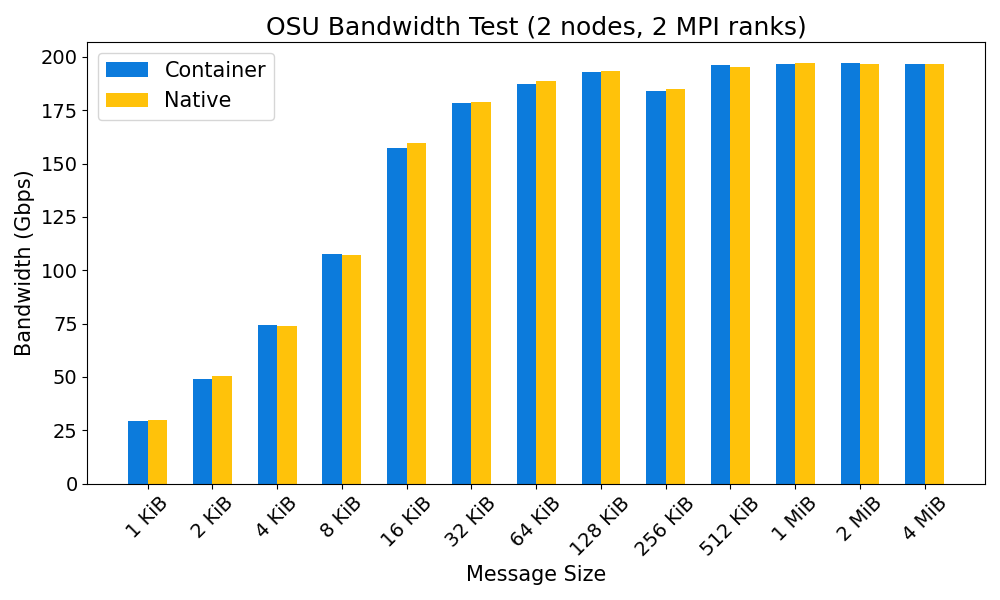
OSU MPI Bandwidth benchmark (2 nodes, 2 MPI ranks): containerised versus native OpenMPI.
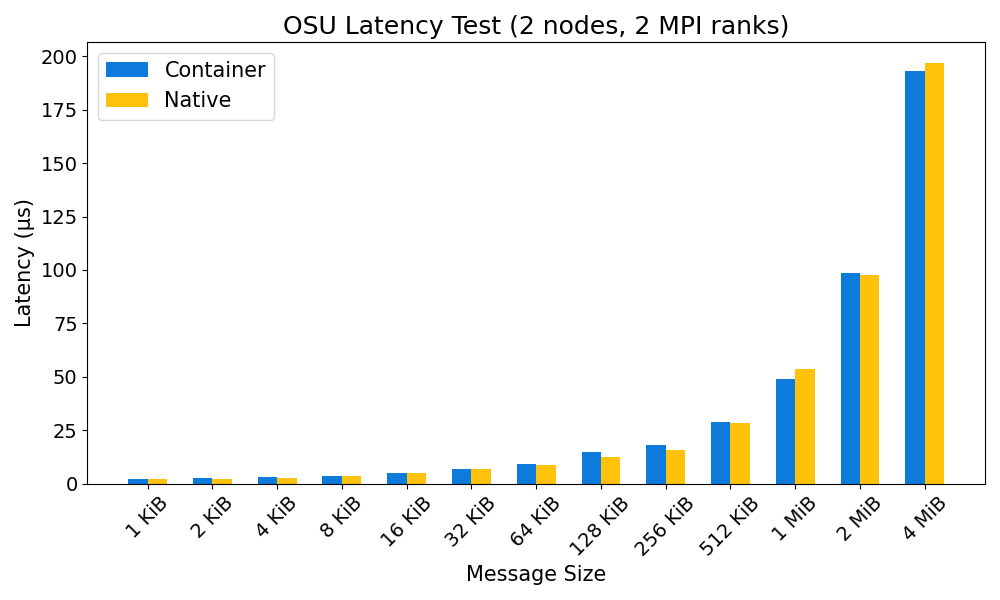
OSU MPI Latency benchmark (2 nodes, 2 MPI ranks): containerised versus native OpenMPI.
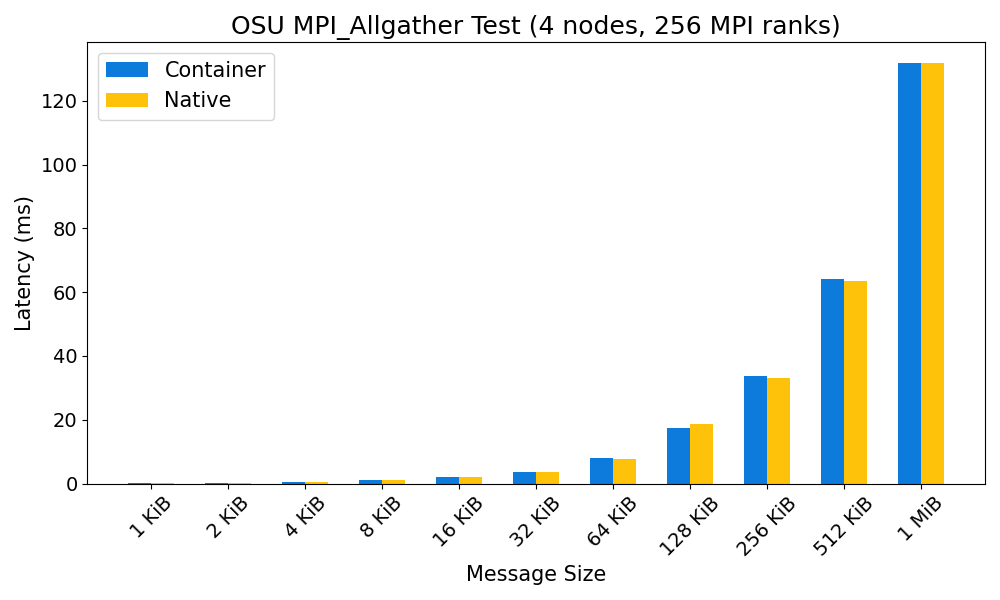
OSU MPI_Allgather collective benchmark (4 nodes, 256 MPI ranks): containerised versus native OpenMPI.
Fakeroot and GLIBC compatibility
Apptainer on NT and OzSTAR combines a root-mapped user namespace with the host fakeroot command so unprivileged users can run package installations during builds (see option 3 in the Apptainer fakeroot documentation).
Because fakeroot is bound in from the host, building from a container image whose GLIBC version differs substantially from the host can fail with an error similar to:
/.singularity.d/libs/faked: /lib64/libc.so.6: version `GLIBC_2.33' not found (required by /.singularity.d/libs/faked)
Check the host GLIBC version on NT or OzSTAR with:
ldd --version
and choose a base image with a compatible GLIBC version. If you must build from an older base image, use the fakeroot-bootstrap script to install a container-compatible fakeroot inside %post, then use that binary for subsequent package installations (see Apptainer: using fakeroot inside a definition file).
Sandbox mode
Warning
Never use sandbox mode for production runs. Sandbox mode unpacks a container into a regular directory of thousands of small files on the host filesystem, completely negating Apptainer's Lustre I/O benefits. Convert your sandbox into a .sif image before running production jobs.
Apptainer's sandbox mode (--sandbox with --writable) unpacks a container to a writable directory so you can iterate interactively during development and testing without rebuilding from scratch on every edit. Once testing is complete, convert the sandbox directory into a read-only .sif image:
apptainer build mycontainer.sif my_sandbox_dir/
Next steps
Apptainer Example Recipes — ready-to-adapt
.defrecipes for astronomy and scientific packages.Python and Conda —
pip-based Python container example and~/.localwarning.Optimising Lustre I/O — combine Apptainer or SquashFS with
$JOBFSfor high I/O throughput.Requesting Resources and Interactive Jobs — request GPUs and
--tmpspace for container jobs.